
Explore the CSSOM View rectangle APIs, coordinate systems, and interactive webpage layouts through examples of multiline text, element boundaries, and pop-up tooltips.
When building a pop-up menu for a webpage, code needs to know where the trigger button is. When marking up a block of multiline text, it needs to know which areas that text occupies. After calculating the CSS layout, the browser can expose page elements' positions and dimensions through geometric APIs. This is a good place to start when learning about ClientRects.
ClientRects Describes the Layout, Not the HTML Source
HTML provides a page's structure, while CSS describes the layout and appearance of its elements. The browser uses this information to calculate the actual layout boxes. CSSOM View defines a set of interfaces related to the page's viewport, scrolling, and element geometry; see the W3C CSSOM View specification.
The common rectangle object DOMRect can represent a rectangle's position, width, height, and edge coordinates. These values are generally measured in CSS pixels, not in physical pixels on the display.
It's important to note that HTML elements and their final layout rectangles don't always correspond one-to-one. An inline element that spans multiple lines may have multiple layout fragments on the page. Depending on the current styles, some elements may also lack a visible layout area in the usual sense.
The Difference Between getClientRects and getBoundingClientRect
These similarly named interfaces serve different geometric needs.
| Interface | Result | Use case |
|---|---|---|
| getClientRects | A collection of rectangles for the layout fragments | Identifying the positions of individual fragments, such as lines of text |
| getBoundingClientRect | A single overall bounding rectangle | Positioning a tooltip or interaction around an entire area, such as a button or card |
Imagine a hyperlink that starts at the end of one line and wraps to the beginning of the next. It occupies two text fragments: the remaining portion of the first line and a section of the second. A collection of rectangles can represent these two fragments. The overall bounding rectangle covers the combined area, which may include space that contains no linked text.
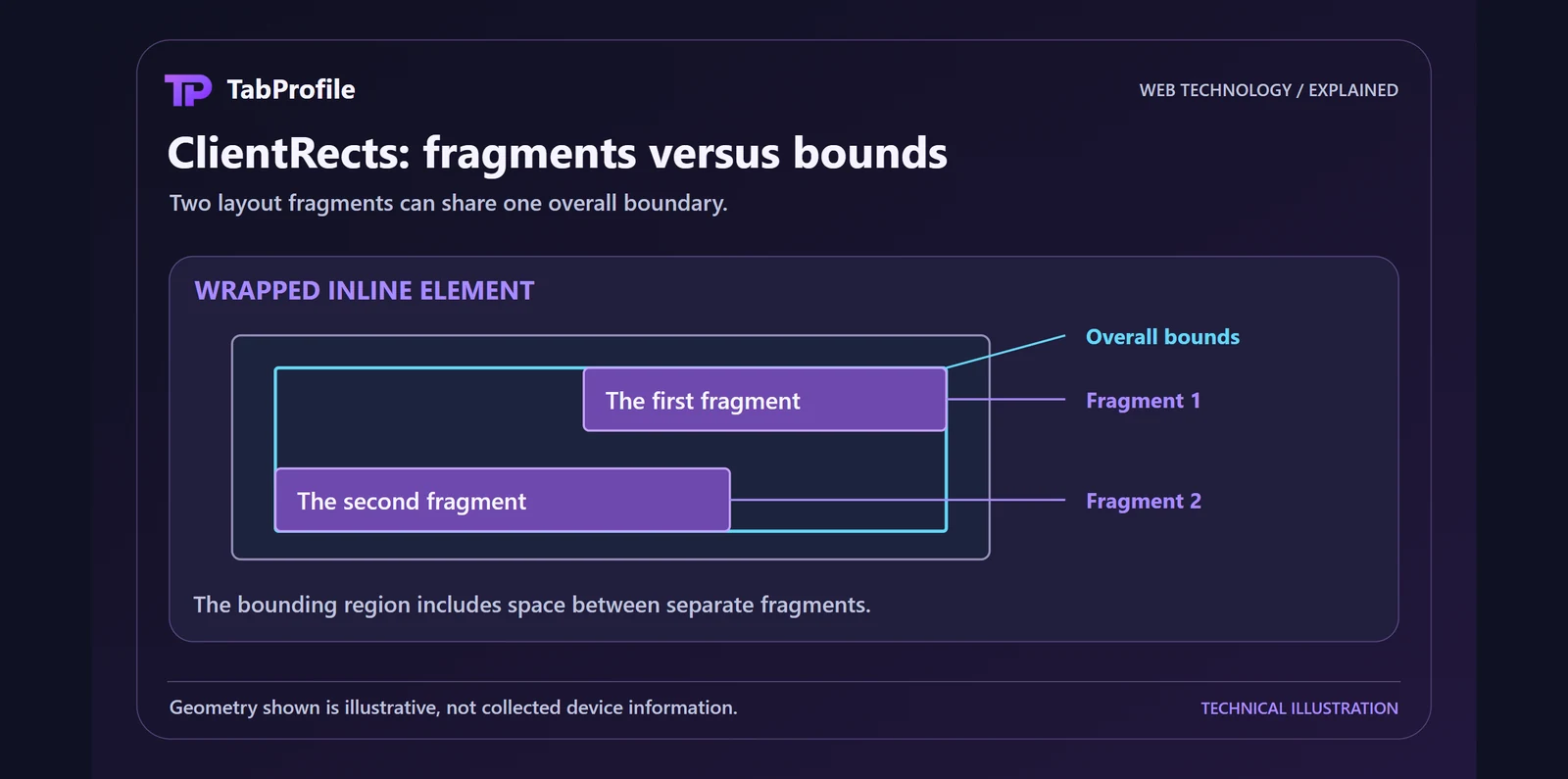
So, if you need to highlight each line of text precisely, use the individual fragments. If you simply want to place a pop-up action menu near an entire object, the overall bounding rectangle is usually more intuitive.
How Does the CSS Box Model Affect Dimensions?
According to CSS Box Model Level 3, an element's box can include different areas: content, padding, borders, and margins. Together, these determine how the page is laid out, but a CSS width declaration alone doesn't necessarily tell you the full space an element ultimately occupies.
For example, suppose a button's text content is 100 CSS pixels wide, its left and right padding are 12 pixels each, and its left and right borders are 1 pixel each. Assuming the standard content-box width and no other constraints, its border-box width will be 126 CSS pixels. Margins provide space around the element for layout and generally aren't part of the border-box dimensions.
Understanding the box model helps prevent a common source of error: a script measures an actual layout area, while a design mockup may label the content area. Confusing the two can lead to offset pop-ups, alignment errors, or unexpected spacing.
Why Do Scrolling, Text Wrapping, and Transforms Affect Position?
An element's geometric position depends on the coordinate system used to observe it. When the user scrolls the page, the element's position relative to the current viewport changes, even though its layout relationship within the document may remain the same. CSS transforms and layout changes can also alter the area displayed on screen.
Geometry data is a snapshot of the layout at a given moment, not a permanently fixed property. Applications need to respond to position changes after appropriate layout updates, especially in scenarios that require ongoing alignment, such as overlays, tooltips, and drag-and-drop interactions. At the same time, avoid triggering layout-related work repeatedly and indiscriminately in high-frequency loops.
Use Geometry to Diagnose Real-World Page Issues
For example, when testing an action menu on your own webpage, try resizing the window, using a multiline heading, scrolling the page, and loading different fonts. Check whether the menu stays aligned with its trigger element. If a problem occurs, first examine the reference coordinate system, the element's border area, and the positioning rules for the pop-up. There's no need to hard-code a layout based on a set of pixel values that happened to work once.
Teams can use TabProfile to organize different frontend pages, bugs that need review, and design acceptance tasks in separate workspaces, making it easier to compare the original page with the results throughout the process. The value of these records lies in helping reproduce interface issues—not in treating a rectangle's values as a permanent device identifier.
Frequently Asked Questions
Do the overall bounding rectangle and the individual fragments always have the same area? Not necessarily. The overall bounding rectangle may cover multiple separate fragments as well as the blank space between them.
Can ClientRects directly represent a display's resolution? No. It describes element geometry in the page layout. A display's physical dimensions and a webpage's layout dimensions are different concepts.
The core purpose of ClientRects is to connect CSS layout with JavaScript interactions. Understanding element boxes, geometric fragments, and viewport coordinates is essential for reliably building interactive interfaces tied to page content.


